Back to work Podonos Private case study

OnePin

From a production brief to an editable voice workflow.

Role
Founding Product Designer
Scope
Research, product design and production frontend

Project details are confidential. Enter the shared passcode to continue.

Need a passcode? Request access

The brief
It starts with one line.
I'm listening…
01 / Translate
First it's translated the way a native would actually say it.
🇺🇸Hi, how can I help you today?
🇪🇸Hola, ¿en qué puedo ayudarte hoy?
🇯🇵こんにちは、ご用件をお伺いします。
🇰🇷안녕하세요, 무엇을 도와드릴까요?
🇩🇪Hallo, wie kann ich Ihnen heute helfen?
02 / Clean up
The tricky bits get fixed before any AI reads them out loud.
Call (415) 555-0132→four one five, five five five, zero one three two
Måneskin→/ˈmɔːneskin/
03 / Assemble
OnePin wires the assembly line: the right voice for each language.
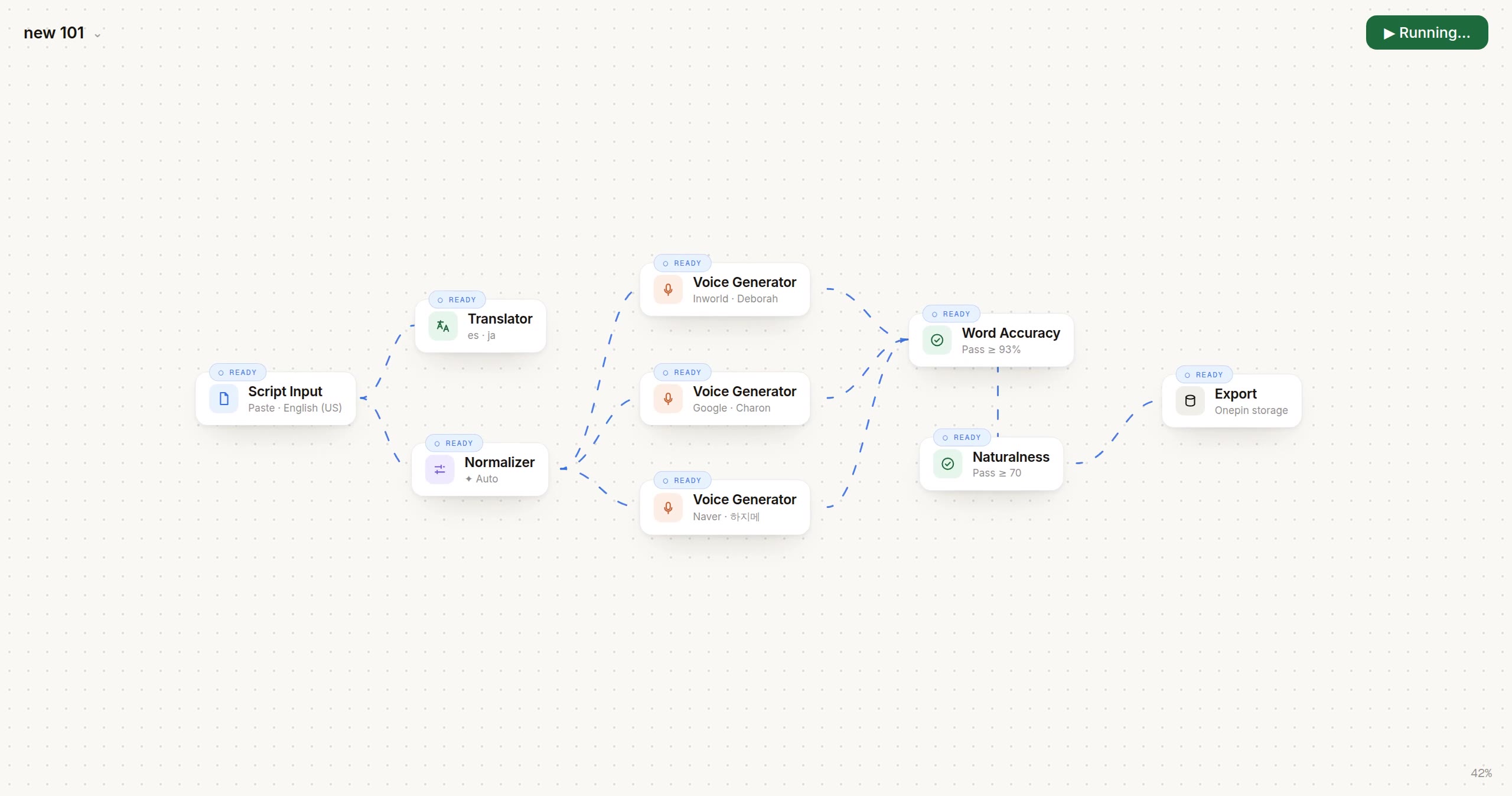
Script Input
1 line · source set
○ Ready
Translator
es · ja · ko · de
○ Ready
Normalizer
numbers · names · dates
✦ Auto
Voice Generator
English (US)
Inworld · Realtime TTS-2
Voice · Deborah
Voice Generator
Spanish
Google Cloud · Gemini 3.1 Flash TTS
Voice · Charon
Voice Generator
Japanese
Naver · Clova
Voice · 하지메
Word Accuracy
Pass ≥ 93% · Retries 0 of 3
Naturalness
Pass ≥ 70 · Retries 0 of 3
Export
Onepin storage
04 / Evaluate
Every take gets scored. Anything weak fixes itself.
scores · accuracy / naturalness / clarity
🇺🇸Inworld · Realtime TTS-2 · Deborah969594
🇪🇸Google Cloud · Gemini 3.1 Flash · Charon979695
🇯🇵Naver · Clova · 하지메728879
🇰🇷auto-picked for ko-KR989796
🇩🇪auto-picked for de-DE969495
scoring five takes against the bar…
Five languages, one bar. And nobody listened to nine thousand takes.
Agentic AI · 0 → 1 · workflow orchestration · designed + built

from conversation to a production-ready voice workflow.

Describe the job. Inspect the workflow. Generate and check multilingual audio in one place.

Founding designer · research, product design and production frontend.

see it live → onepin.ai
Hours
Pilot processing; human evaluation excluded.
Pilot observation
5 → 1
Five stages. One connected workflow.
Workflow
9,000
3,000 lines × 3 takes.
Workload scenario
Role
Founding Product DesignerLed design, alongside one other designer
Timeline
Q1–Q2 20263 weeks on-site in Seoul
Team
10-person startupFounder, engineering and design
My contribution

Research, interaction design and the production frontend.

Engineering owned the evaluation backend.

01 · Context
Podonos EA Sports

Evaluating voices revealed a bigger workflow problem.

Podonos was working with EA on human voice evaluation. Understanding that work exposed the full production journey: many steps, multiple people and manual handoffs.

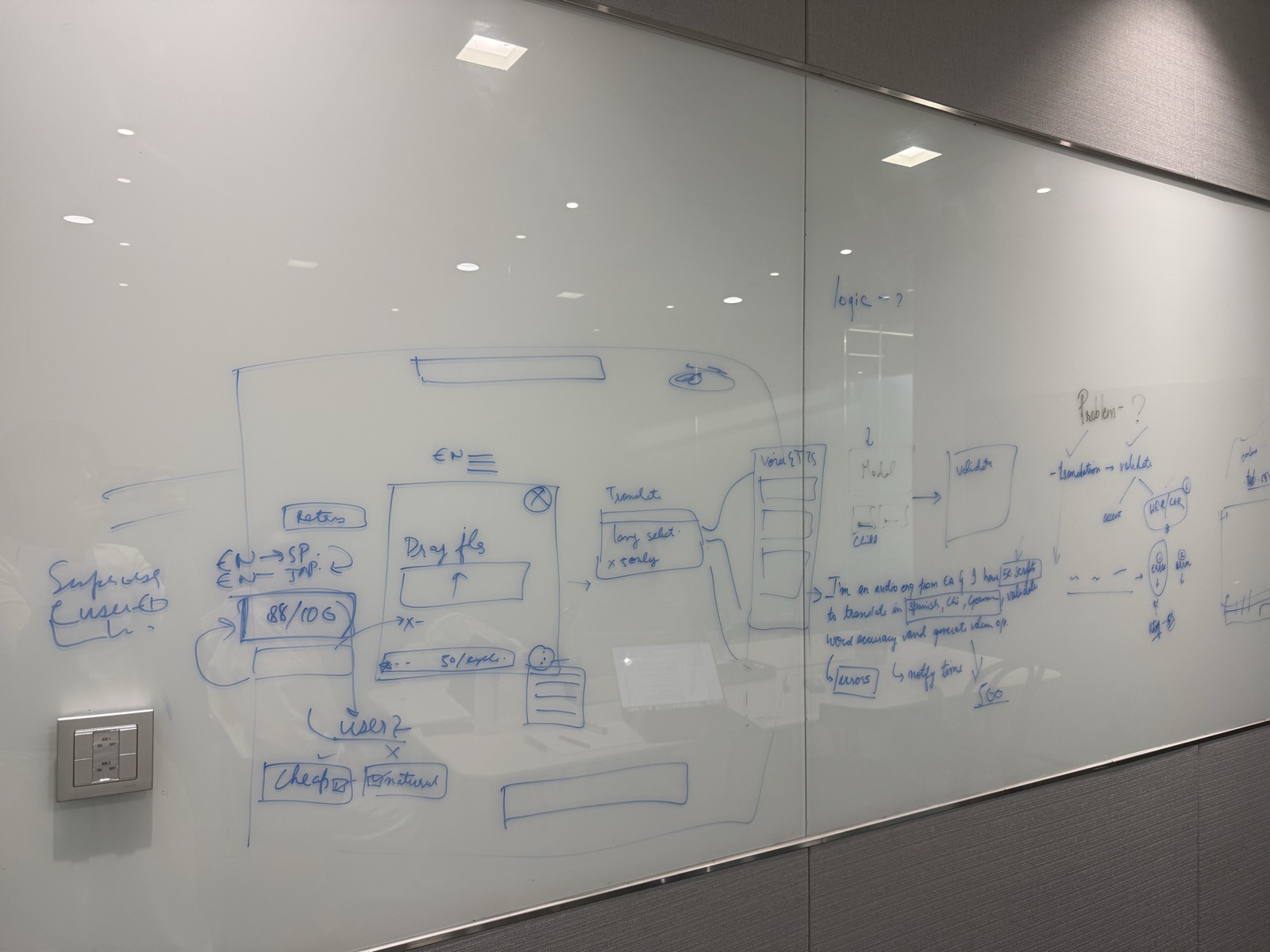
Seoul whiteboard mapping script input, translation, voice generation and validation.
Mapping the production journey in Seoul.
  1. 01ScriptSource content
  2. 02TranslateEach language
  3. 03GenerateVoice takes
  4. 04EvaluateHuman review
  5. 05ReviseFix and review again

The challenge wasn't one bad take. It was coordinating the work between them.

02 · Problem

nobody knew if the voice was even right.

01

Can't judge quality

No shared way to tell if an AI voice even sounds human.

02

Which API, which language?

Every API wins for a different language. Teams just guessed.

03

A 10-day pipeline

Five hand-offs before a single line ships.

“
the signal · interviews + reddit
which API works best for Spanish?
AITubersPodcastersEnterprise broadcasters
Asked over and over, and every interview confirmed the same 10-day reality.
Workload example · One 3,000-line script
0
Three takes per line adds up to 9,000 audio files.
03 · The shift

From handoffs to one editable workflow.

BeforeSeparate handoffs
  1. Script
  2. Translation
  3. Voice generation
  4. Quality review
  5. Revisions
Simplified prior process.
AfterOne shared canvas
OnePin connects script, translation, generation and quality checks on an editable canvas.
Actual OnePin workflow.

The steps remain. The coordination moves into one place.

04 · Conversational setup

A brief becomes an editable workflow.

Describe the output in chat. Inspect the steps on the canvas, then adjust what you need.

01

Describe

Set the output and languages.

02

Inspect

See the connected steps.

03

Adjust

Edit a node or rerun a branch.

Control stays in the interface.

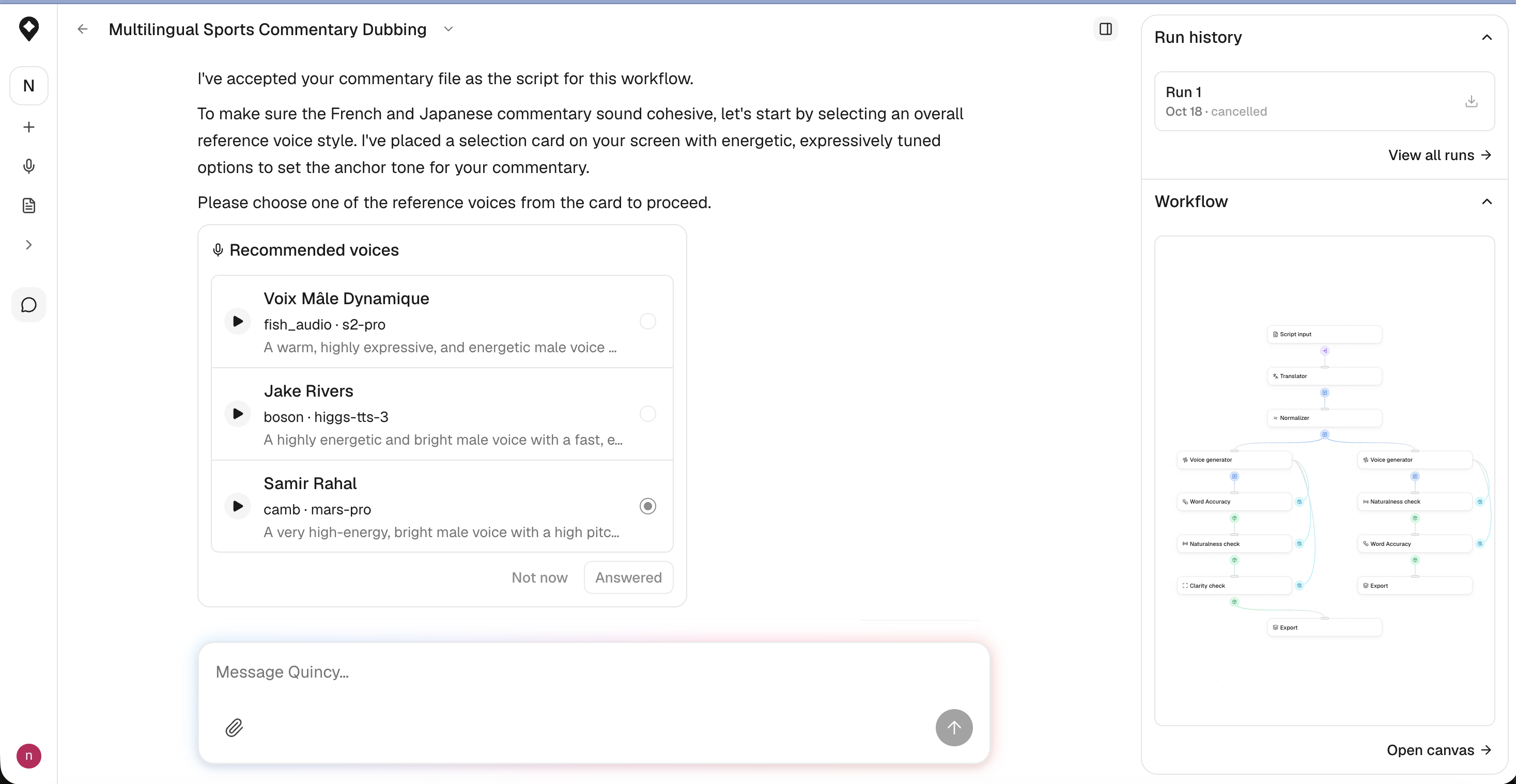
Quincy interface with a message composer, reference-voice selection and a visible workflow panel.
Actual product interface, with annotations. View full size
  1. 1
    Express intent

    Describe or refine the job in chat.

  2. 2
    Make a choice

    Select a reference voice from real options.

  3. 3
    Inspect the plan

    See the workflow and open the canvas.

05 · Process

designed for humans, and for agents.

Understand the work. Explore alternatives. Make the trade-offs visible.

The inputs behind the decisions.

User interviews and EA conversations shaped the problem. Founder discussions and Seoul fieldwork added domain context, not independent user validation.

  • User interviews
  • EA conversations
  • Seoul fieldwork

in their own words

Illustrative stock portraits, not photos of interview participants. Photo credits

“I can run ten different TTS APIs, but I still can't tell which one actually sounds right for Spanish.”

Diego R.AITuber · Multilingual
“We over-produce everything defensively, thousands of files, just so a human can catch the bad takes later.”

Hana S.Audio Producer
“By the time a single line is approved, it's been through five hand-offs and about ten days.”

Marcus L.Production Lead

Three decisions that shaped the experience.

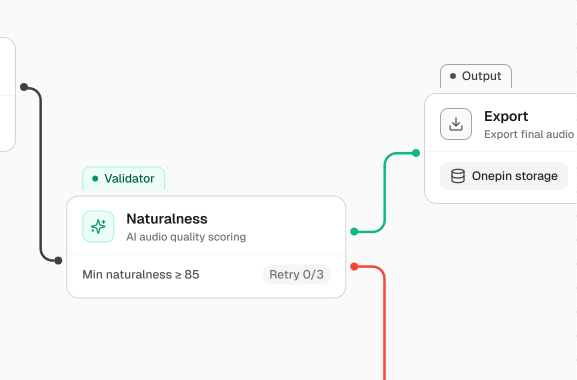
Forms handled settings. Nodes made the structure editable.

I explored forms first. Team reviews pushed me toward nodes for flexible workflows, accepting a learning curve around what each node does.
Exploration: form setup
Direction: editable graphOnePin node canvas showing connected generation and evaluation steps.
Schematic of the form approach, not an archived screen. The node graph shows the product direction.

Conversation to start. A canvas to inspect.

My hypothesis: describing an outcome could ease setup. I kept the canvas for inspection and editing, rather than replacing it with chat.
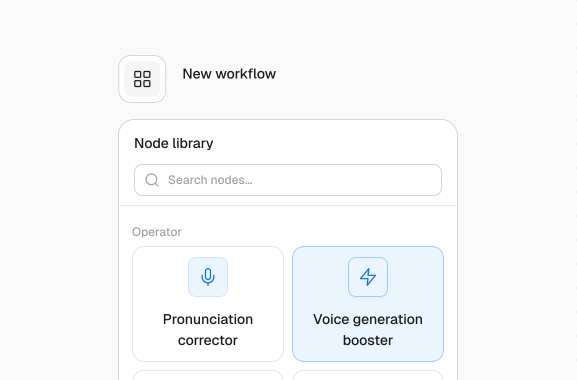
Express intent in chatOnePin conversation panel used to describe a production task.
Inspect the resulting workflowEditable node graph makes the production steps visible alongside conversation.
Two complementary surfaces. Reduced setup burden remains a hypothesis, not a measured usability result.

Make the disagreement testable.

My PM felt users could connect nodes themselves. With permission to explore, I prototyped the alternative and demonstrated it at a GTM meeting.

  1. QuestionIs conversation necessary?
  2. ExploreWorking prototype
  3. GTM responseAdvisor support
Conversation became a core feature. Advisor support was not a usability test or proof of adoption.

reframe the question

Turn subjective quality questions into criteria teams can inspect.

prototype the decision layer

Make model choices and evaluation results visible in the interface.

validate against the manual chain

Compare interview findings with pilot observations. Keep their different scopes explicit.

ship the system, not screens

Build the frontend, then iterate with engineering on the working experience.

06 · Designing the judgment

teaching a machine to hear taste.

Make quality criteria visible, configurable and reusable.

inside the layer
One decision rail, from script to shipped.
In
script, text, or a voice note
Correct
text fixed before synthesis
Decide
the winning model, per language
Validate
accuracy · naturalness · clarity
Out
only what clears your bar
The rest is flagged for a human. Friction only where it protects quality.

Every correction and validator is selectable, so creators and broadcast teams can set different standards without rebuilding the pipeline.

The actual product, in motion.

Build and run a voice workflow

Recorded workflow demo.

From a brief to a workflow.

Five decisions in Quincy, shown in 55 seconds of recorded interaction.

01 · The brief

Start with the outcome.

Attach the script and describe the languages and delivery. The user starts with the job, not node configuration.

13 seconds · Script and production brief
02 · Reference voice

Make the choice in context.

Reference voices appear inside the conversation, where the user can preview and select the tone.

18 seconds · Reference-voice selection
03 · Language voice

Guide the next decision.

Quincy narrows the options for the French voice. Similarity cues support the choice; the user still selects it.

12 seconds · Recommendation scores are product UI, not study results.
04 · Quality checks

Keep the checks adjustable.

Word accuracy and naturalness are already selected. The user adds clarity without leaving the conversation.

6 seconds · Quality-check selection
05 · Workflow review

Show what the conversation built.

The graph exposes translation, generation and quality-check branches for inspection.

6 seconds · Run in progress, not a completed production result.
07 · Solution

One workflow. Visible control.

Start in chat, adjust the graph, and inspect audio quality.

Chat and canvas

Describe the job in chat. Fine-tune the same workflow on the canvas.

Visible evaluation

Inspect quality scores alongside the generated audio.

Room for human review

Surface low-scoring output for review, rather than hiding uncertainty.

Adjustable quality checks

Choose the checks and thresholds that fit the production brief.
OnePin productionlibrarysettings
OnePin agent panel: describe the localization job in plain language and the agent routes the model, injects phonemes and explains its choice OnePin node graph: script in, corrected, validated against naturalness/word accuracy/noise/pronunciation, ready to ship
the OnePin production surface · some details redacted out of respect for the team

The workspace beyond the canvas.

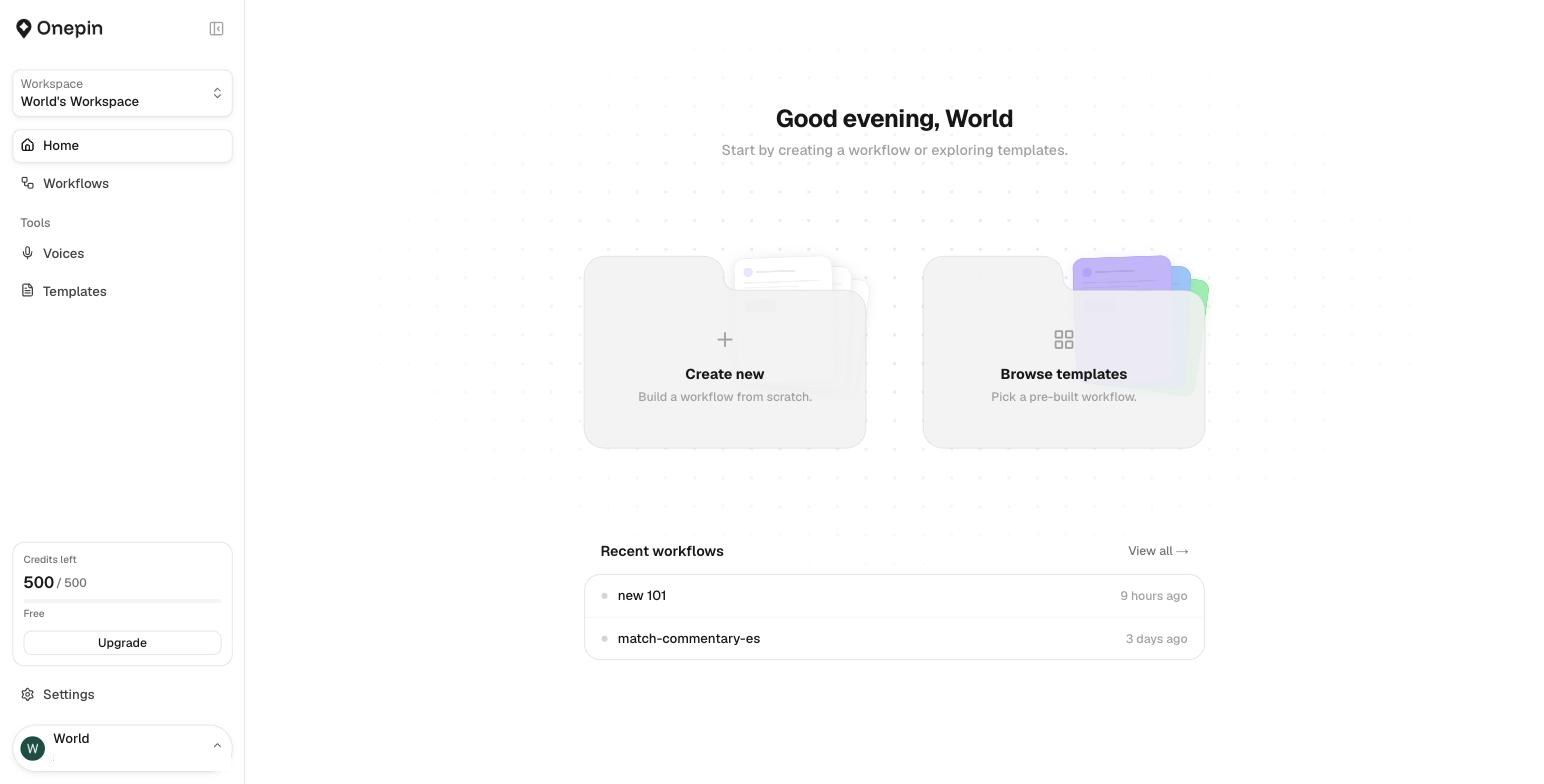
OnePin home: create a workflow, browse templates, recent workflows
Start or return to work. Create a workflow, use a template, or pick up a recent project.
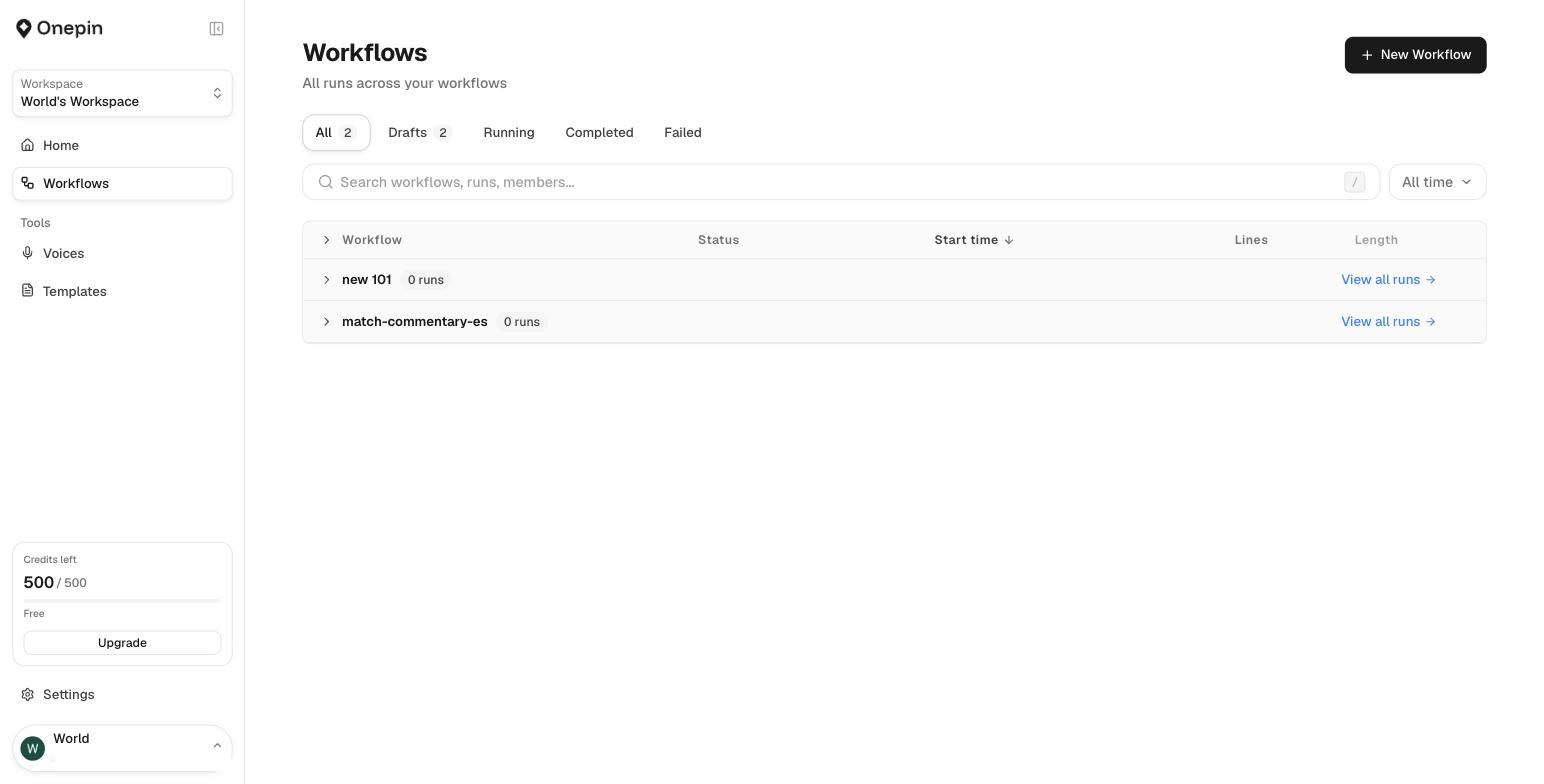
Workflows list with runs, drafts, statuses and search
Keep production visible. Find workflows and track drafts, runs, and their status.
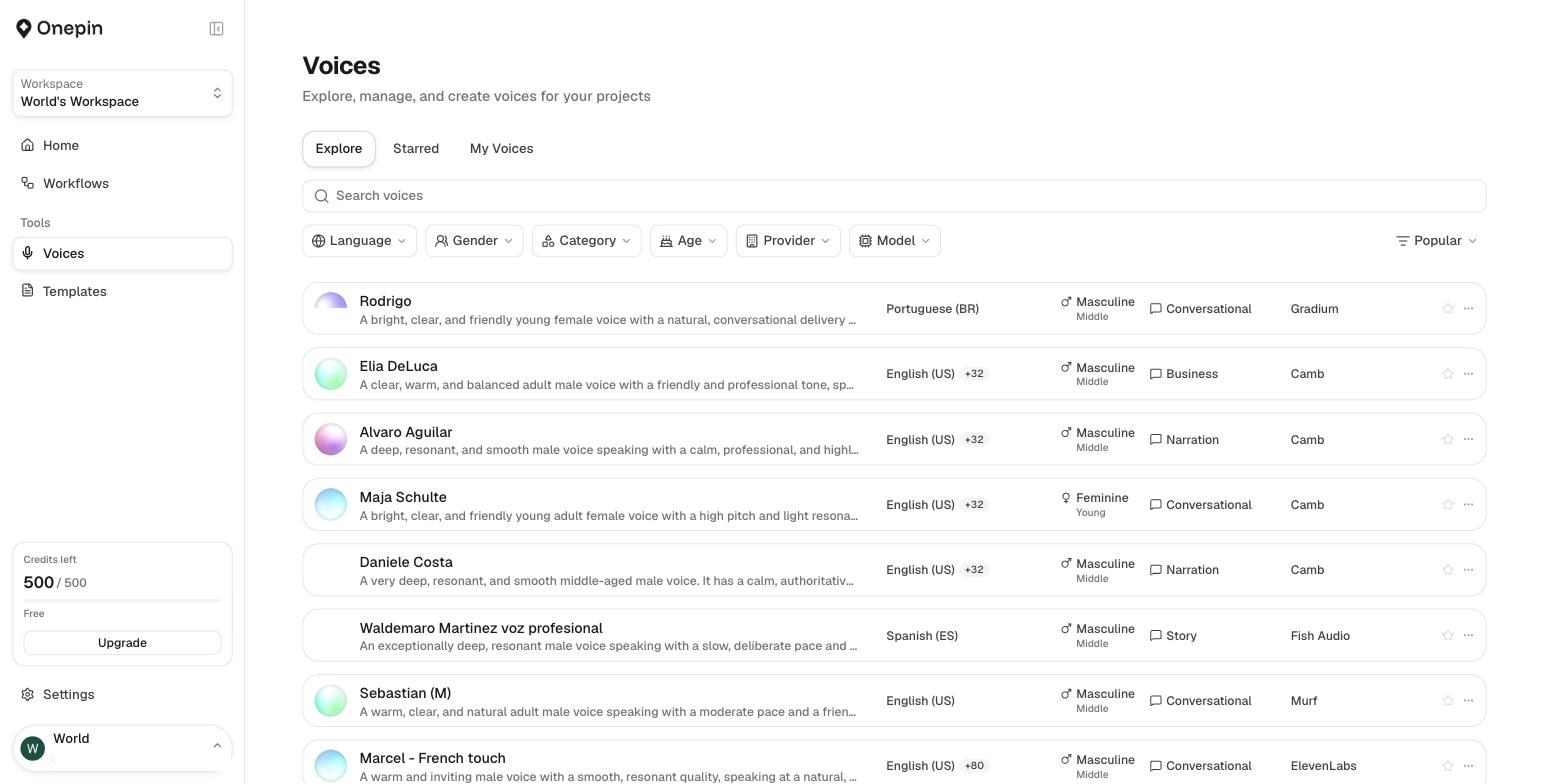
Voices library: filter by language, gender, category, provider and model
Find the right voice. Compare options across languages, providers, and models.
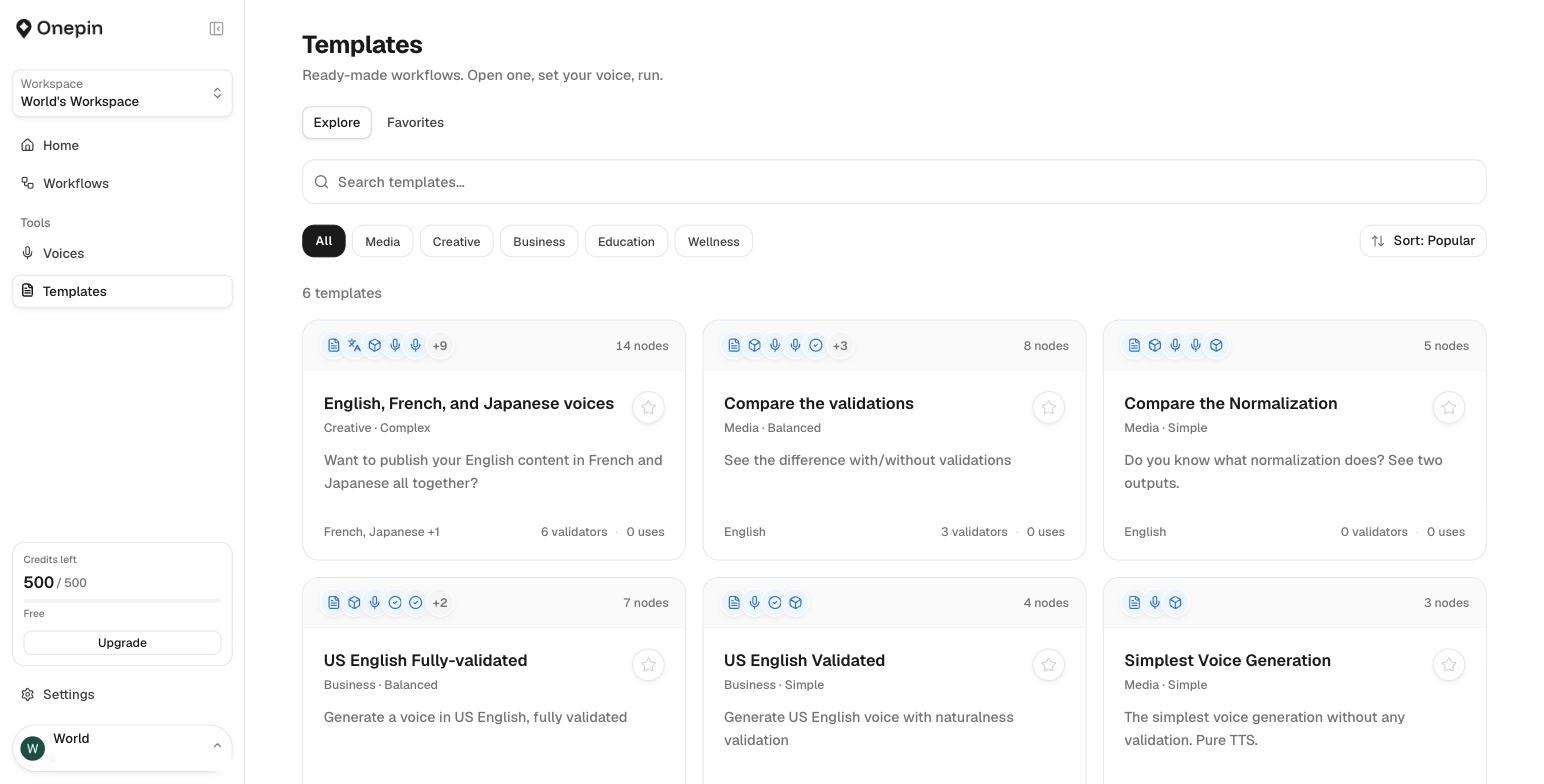
Templates: ready-made workflows with categories and validators
Reuse a starting point. Templates bring generation and validation steps together.
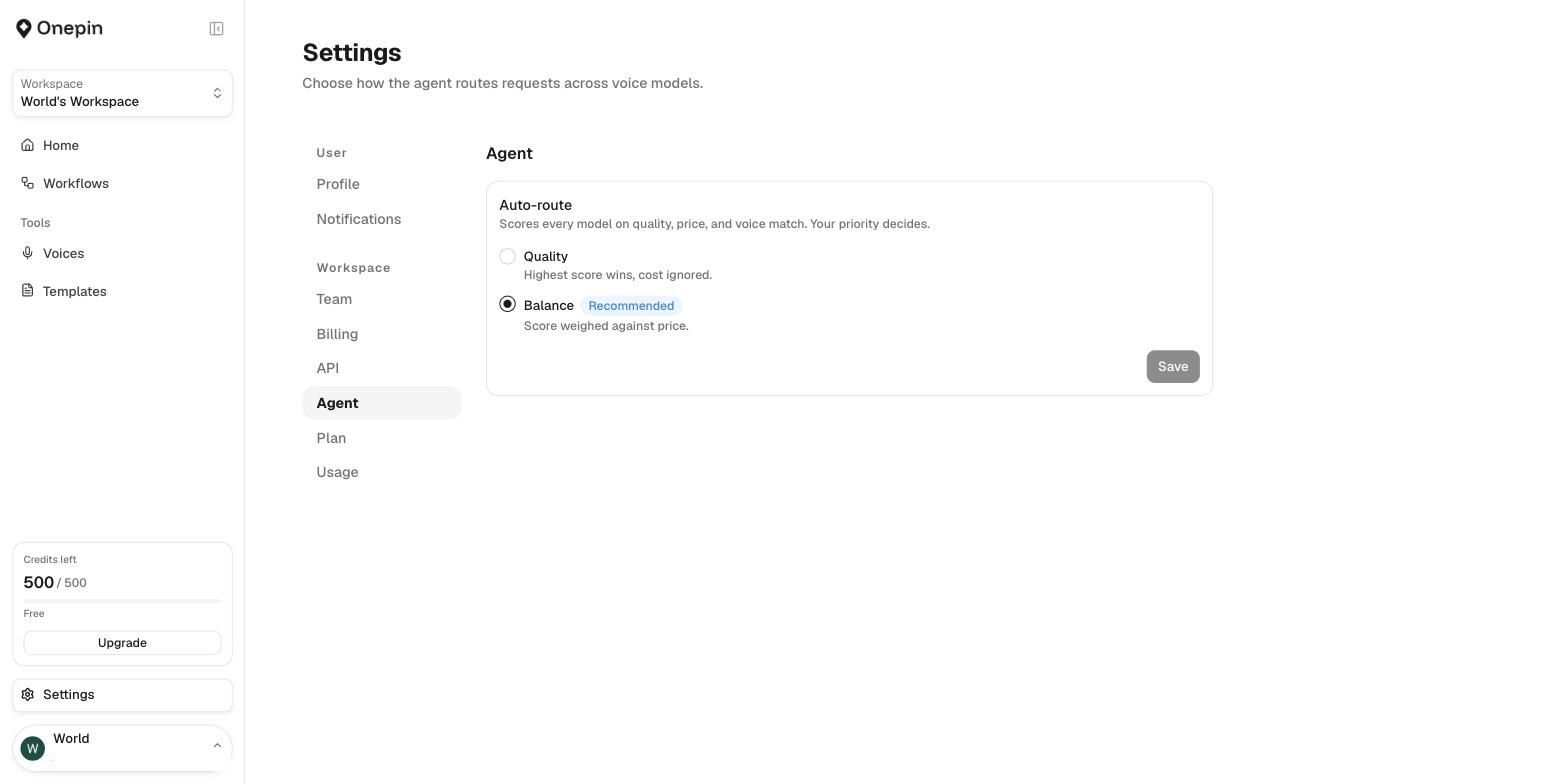
Settings, Agent: auto-route scores every model on quality, price and voice match
Set the routing preference. Choose quality-first or balanced model selection.
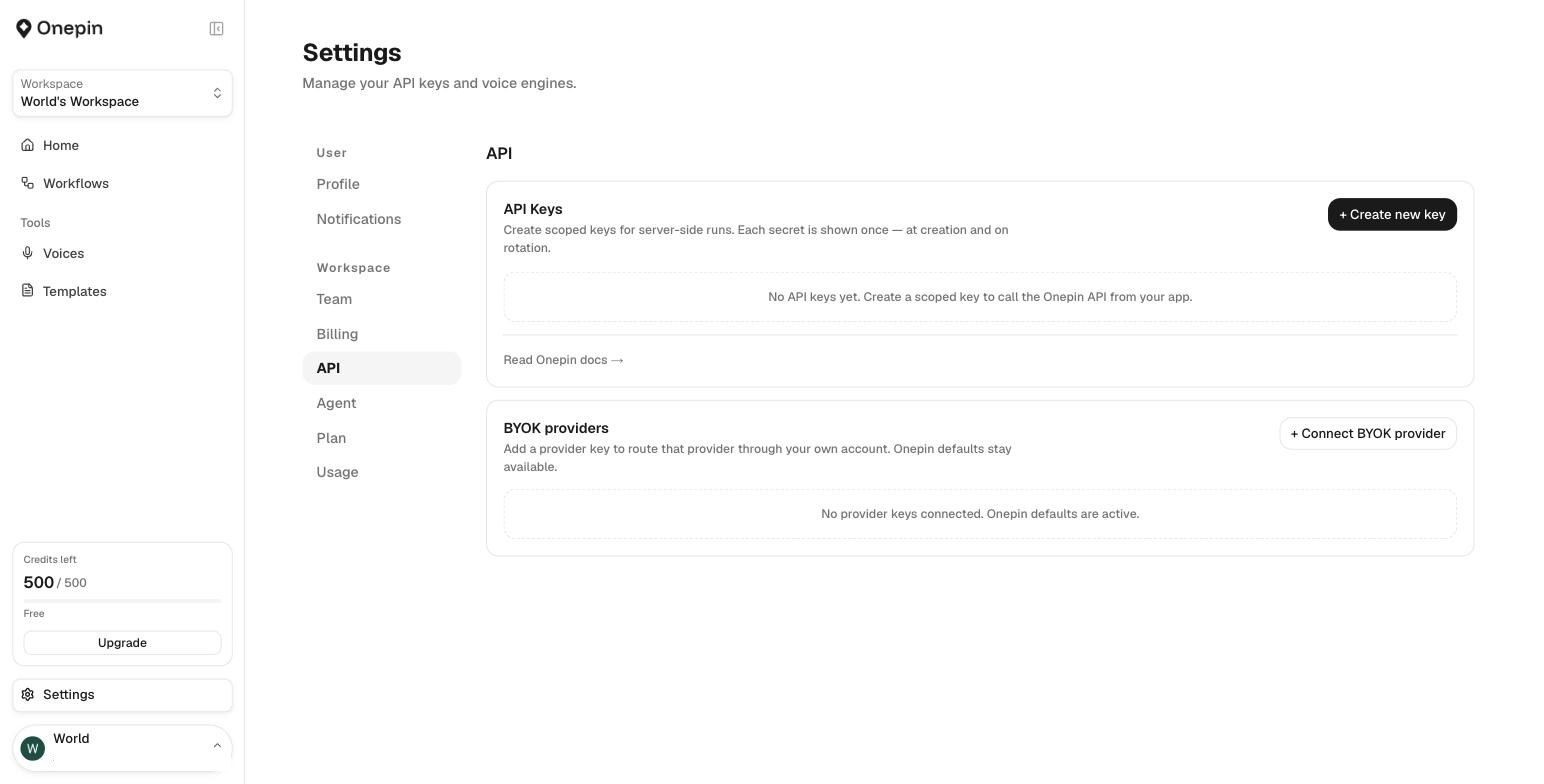
Settings, API: scoped keys and bring-your-own-key providers
Connect the production stack. Manage API access and bring-your-own-key providers.

becoming my user

I learned the problem by living in it. Three weeks in Seoul with the founder taught me where accents drift, names break and technically clean takes still sound wrong. Those observations became validators a localization lead could trust, not another generic score.
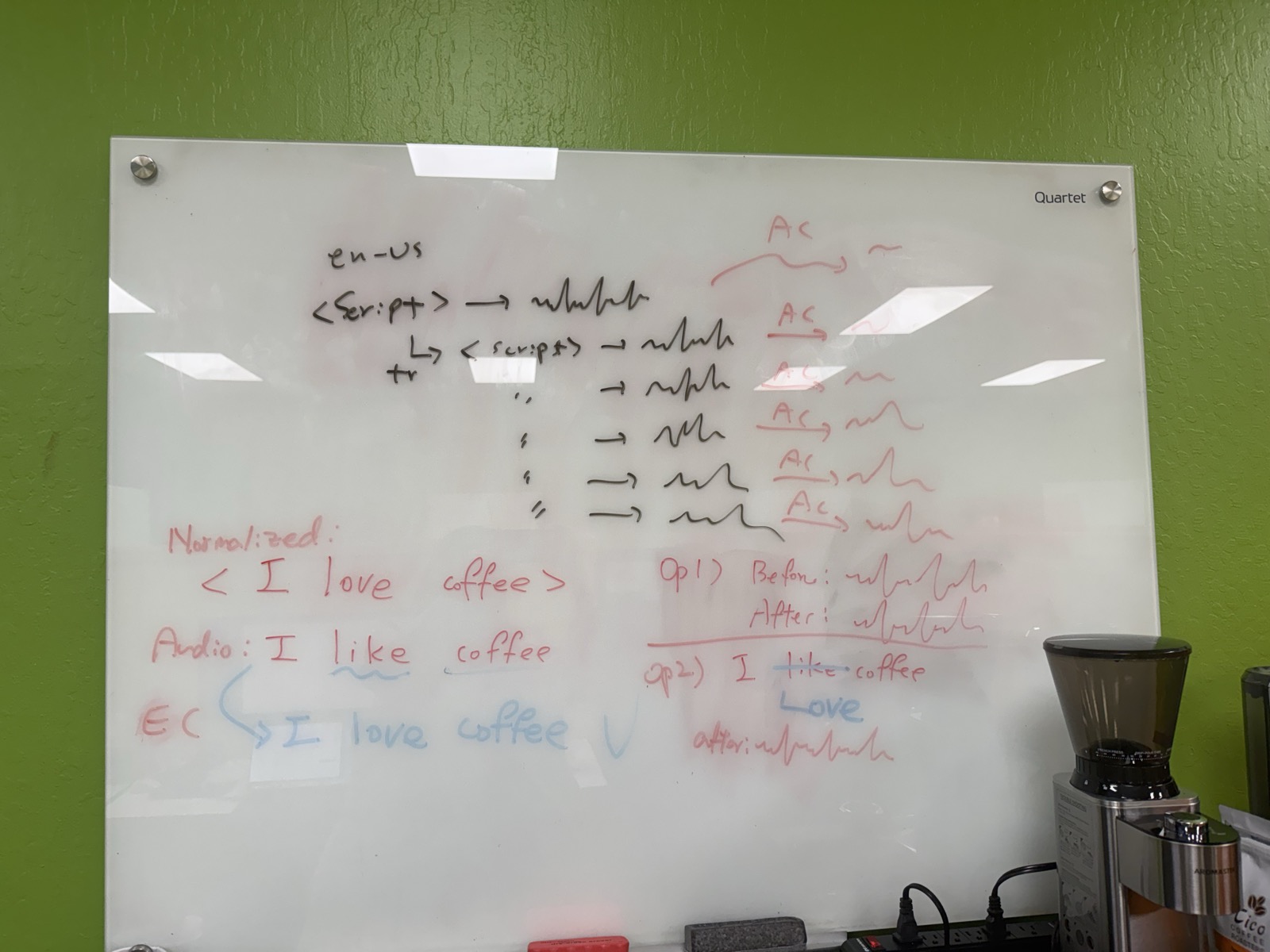
Whiteboard sketch of the OnePin flow: input, translate, model, validate, errors → notify, Seoul on-site
Whiteboard working through audio normalization and correction examples, Seoul on-site
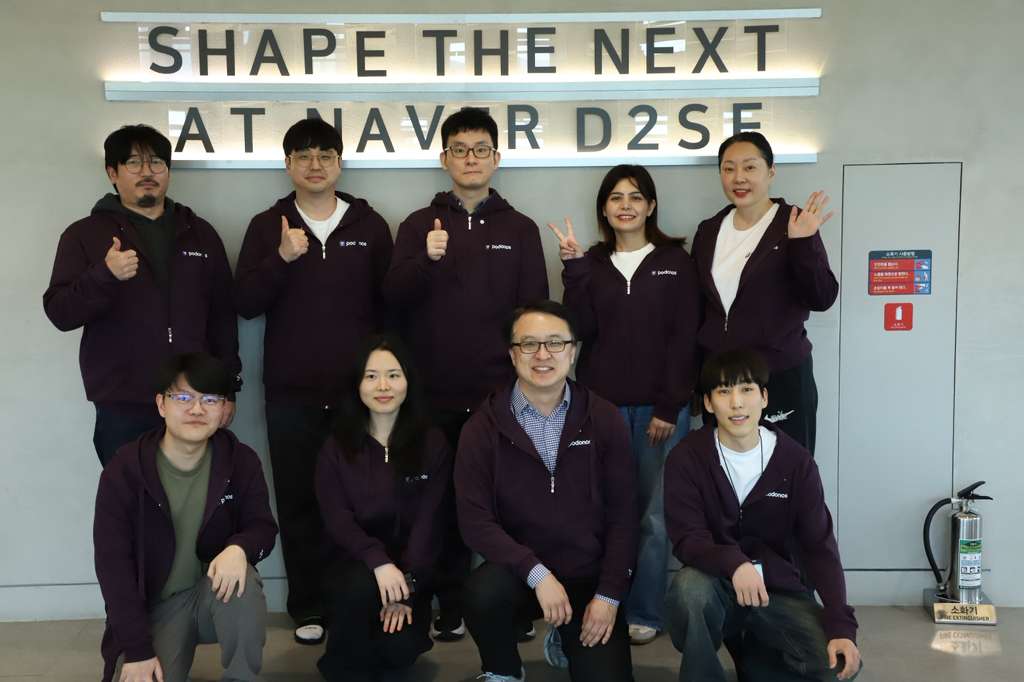
The Podonos team together at NAVER D2SF, Seoul
behind the build · whiteboards and the Podonos team · 3 weeks on-site at NAVER D2SF, Seoul
08 · How I built it

from Figma to shipped, with AI.

Reusable Figma components became a working production frontend.

my process · from idea to shipped

01
own
ship, not just design
02
immerse
3 weeks in seoul
03
scope
judgment, not generation
04
systemize
build-ready components
05
build
figma make · claude code
06
ship
live · onepin.ai
07
iterate
validators keep learning

Figma Make + Claude Code accelerated implementation. I owned the interaction decisions; engineering owned evaluation.

09 · Impact

what it changes, three ways.

For the user
Connected

Translation, voices and quality checks in one editable workflow.

For the business
Configurable

Teams can set and reuse their quality criteria.

For the org
Shipped

Research and product design carried through to production frontend.

Measurement scope and limitations

Interview baseline: roughly ten days, reported in user interviews and EA conversations. Demo/pilot: processing in hours; excluded human evaluation. These scopes are not established as equivalent, so no percentage savings is claimed.

5 → 1: workflow consolidation, not tasks eliminated. 9,000 takes: 3,000 lines × 3 takes, not measured files eliminated.

Built & shipped · now live at onepin.ai

10 · Reflection

simpler setup.
Visible control.

Forms taught me that simplifying settings isn't the same as simplifying a workflow. Chat and canvas answered different needs: getting started and staying in control.

Next: test that balance with users and measure comparable end-to-end production tasks.

We were producing thousands of takes by hand just to be safe, then waiting days for a human pass. A layer that decides, validates, and flags the edge cases is exactly what we never had.
Enterprise localization lead · customer research
11 · Beyond the Figma file

I shipped the system, not just the screens.

From research and interaction design to a working production frontend, in partnership with engineering.

✕